I built PasteBop because I kept pasting text that looked right and wasn't.
You copy a paragraph out of a chat assistant, a Google Doc or a PDF. It looks
like plain text. It isn't. The apostrophes are U+2019, the dashes are em
dashes, the three dots are one ellipsis character, and somewhere in there is a
zero-width space nobody put there on purpose. Paste that into a shell, a YAML
file or a commit message and you find out the hard way: the quotes aren't
quotes, the dash isn't a hyphen, and git doesn't care how good it looked in
the chat window.
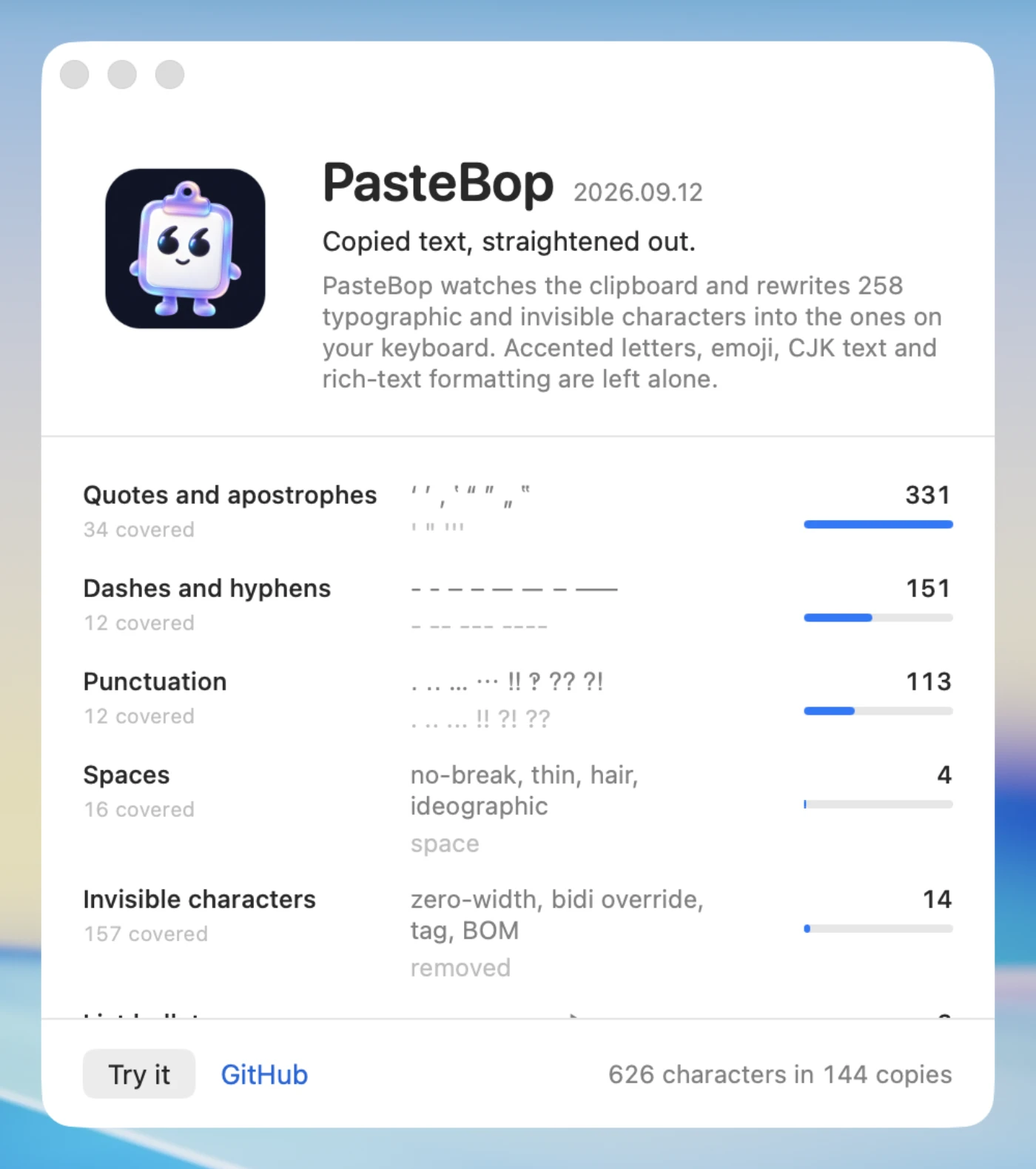
PasteBop watches the clipboard and fixes it before you paste.
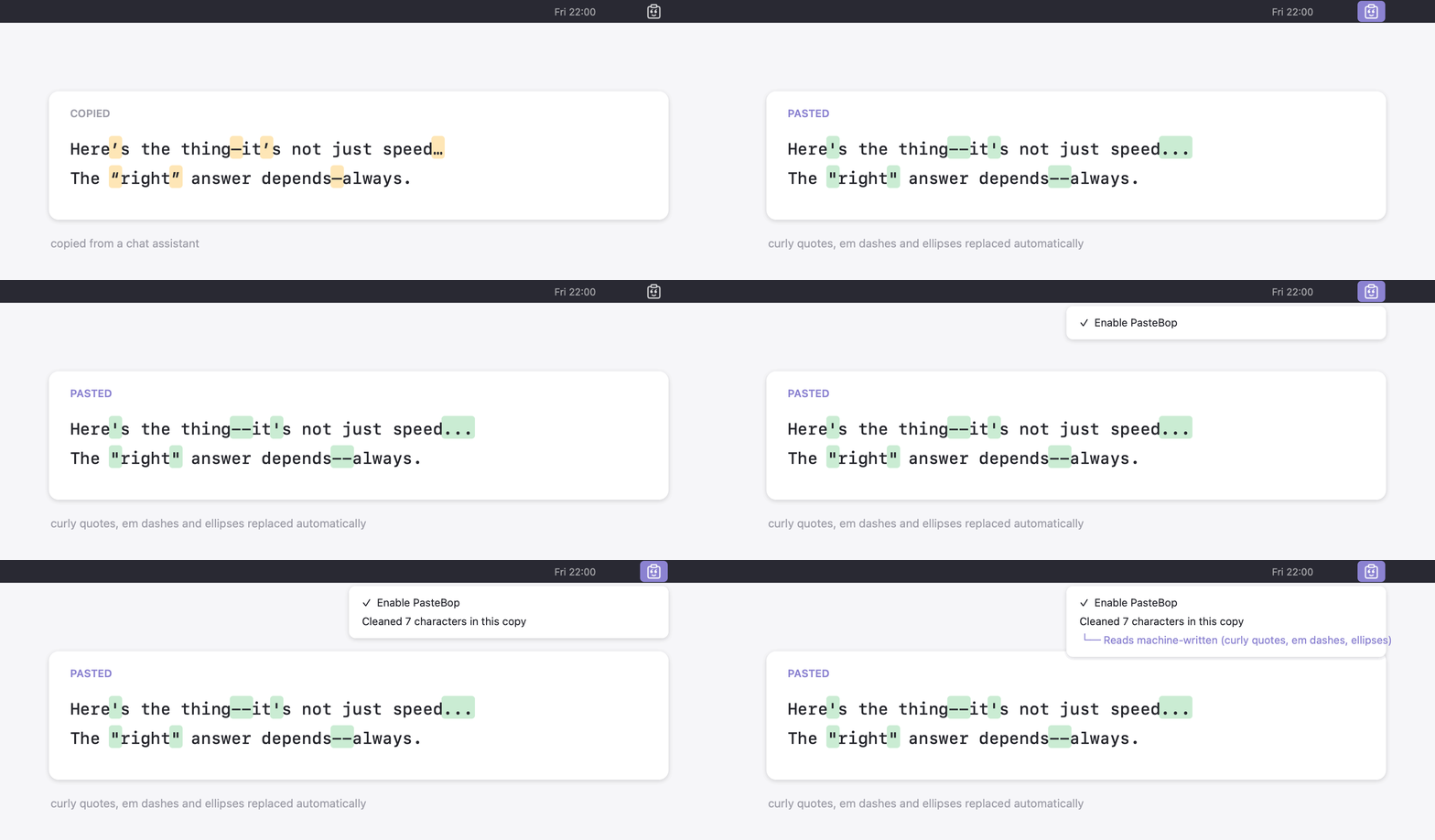
“It’s fine,” she said—then paused… café «naïve» ≈ 3×4 → 12 OK.
"It's fine," she said--then paused... café "naïve" ~ 3x4 -> 12 OK.
That's 257 characters it rewrites. Everything else it leaves alone.
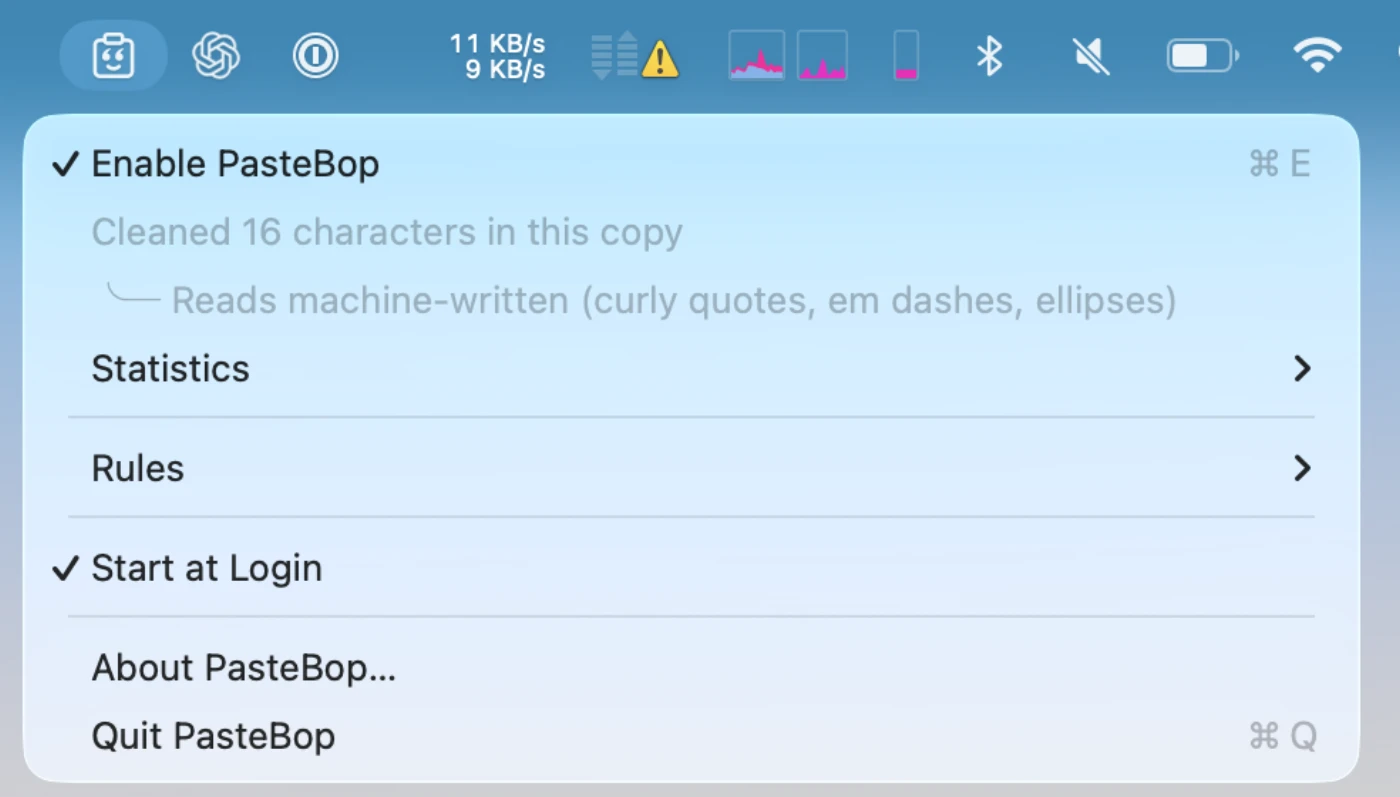
It lives in the menu bar and mostly you forget it's there.
Why this and not a text filter #
Two reasons I couldn't get from a shell alias.
It has to happen on copy, not on paste. A filter you have to remember to run is a filter you forget. PasteBop polls the clipboard every 100 ms, which is under human reaction time, so the text is already clean by the time your hand gets to ⌘V.
Some of those characters are a security problem, not a style problem.
Bidi overrides and isolates (U+202A-U+202E, U+2066-U+2069) are the
Trojan Source attack: they let source code render
in one order and compile in another. The invisible tag block
(U+E0000-U+E007F) is a clean channel for smuggling instructions into text a
model will read. Both are invisible in every editor I use. PasteBop deletes
them, and it's the only reason I'd call it more than a convenience.
Being conservative is the whole job #
A wrong rewrite corrupts someone's text silently, which is worse than not rewriting at all. So the table is deliberately small and full of things it won't touch:
| Kept | Why |
|---|---|
é ñ ü ç ø å ß and every other accented letter | typable on international layouts |
© ® ™ § ¶ ° € £ | intentional symbols, not typographic residue |
U+200C ZWNJ, U+200D ZWJ | load-bearing in Persian and Hindi, and in emoji like 👨👩👧 |
U+200E LRM, U+200F RLM | real formatting in mixed right-to-left text |
。、「」 and fullwidth forms | correct CJK punctuation |
· middle dot | a letter in Catalan (l·l) |
U+FFFD replacement character | it signals data loss, so it should stay visible |
The same instinct runs through the rest of it. Items tagged
org.nspasteboard.ConcealedType - what password managers set - are never
touched. If any flavour of a clipboard item can't be read back, the whole item
is left alone rather than risk dropping a promised file. And because one copy
is one text spelled several ways, if the HTML can be rewritten but the plain
text can't, neither is: a clipboard holding two spellings of the same thing
is worse than one holding none.
Rich text, not just plain #
Copy from a browser or Word and the clipboard carries HTML and RTF alongside the plain text. PasteBop rewrites all of them, so the result is the same wherever you paste.
RTF is rewritten in place - only the escaped characters (\'93, \uN,
\emdash) get decoded and replaced, so every font, colour and style run stays
byte for byte identical. HTML is split into markup and text, and only text
nodes are rewritten; turning « into " inside title="«x»" would break the
attribute. Markup a rule produces gets escaped, so ← becomes <- and not
an accidental tag.
Without copying at all #
Select text in any app, right-click, Services → PasteBop → SelectBop. The selection is rewritten in place and nothing goes through the clipboard, so whatever you had copied stays copied. It works on styled text too - fonts, colours and links survive.
It has an opinion about where your text came from #
This one started as a joke and stayed because it's accurate more often than it should be.
PasteBop already counts every em dash, curly quote and ellipsis it rewrites. That turns out to be most of a fingerprint, so it tells you:
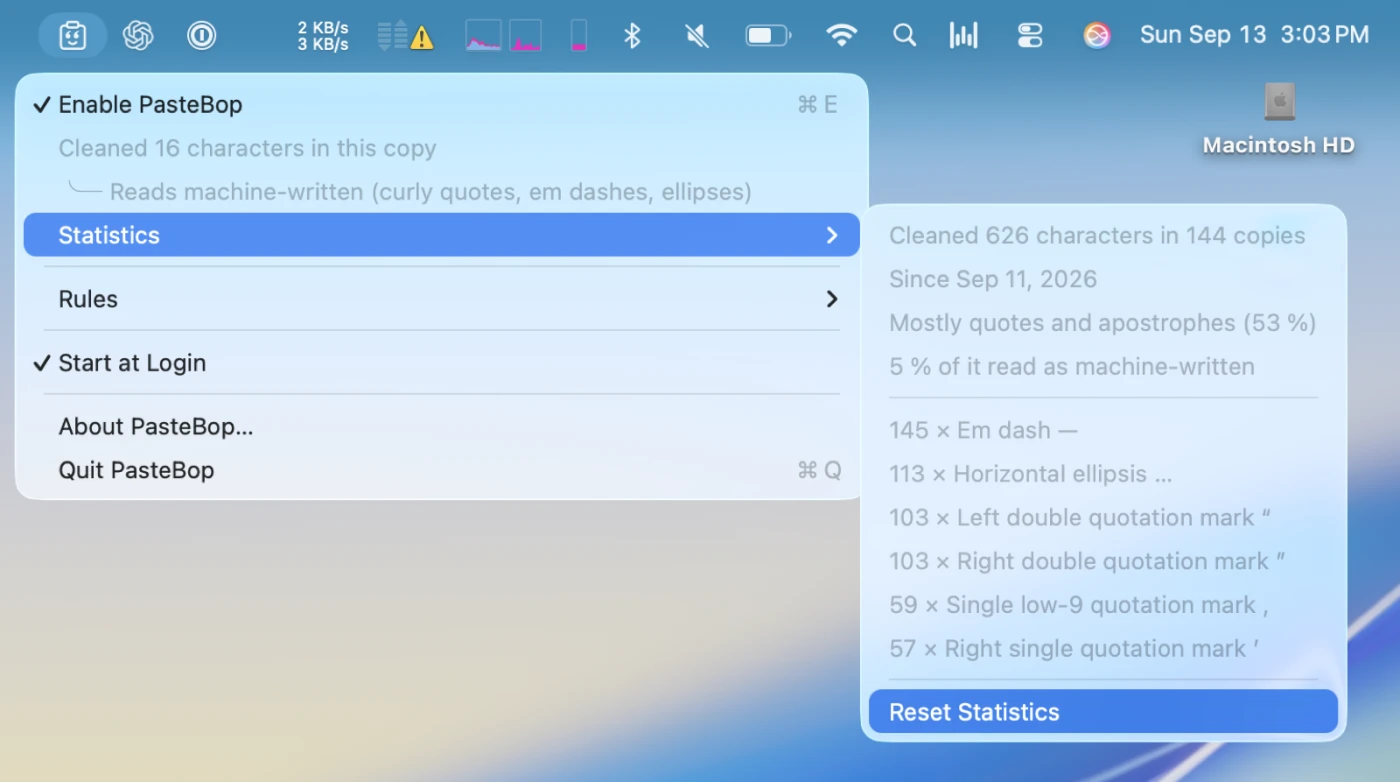
What it actually measures is typographic polish, and a word processor produces
plenty of that on its own - so the discriminator is variety across marker
families, not volume. Smart quotes alone are Pages or Word, and it says
Reads word-processed. Quotes and em dashes and ellipses together are the
house style of a chat assistant. Below 240 characters it says nothing, because
the density of a tweet means nothing.
This reads a handful of integers that were counted anyway. No text is examined, stored or sent anywhere - there's no network call behind it and nothing to opt out of. It's a heuristic, and it's wrong about anyone who types em dashes by hand.
Changing what it does #
Rules ▸ Edit Rules... lists every character with a switch beside it.
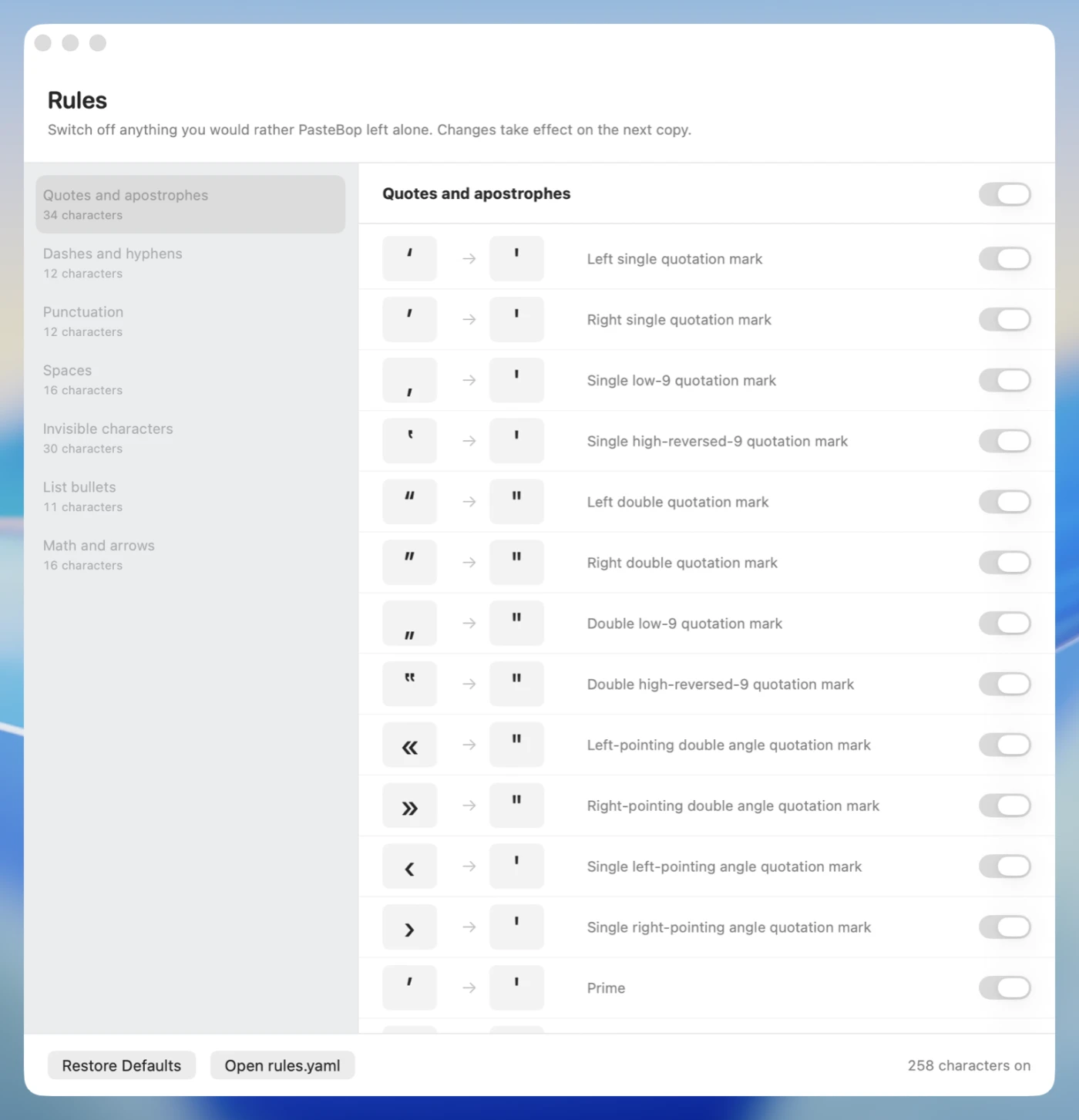
Behind the window is ~/Library/Application Support/PasteBop/rules.yaml, which
is where you change what a character becomes rather than whether it's touched:
version: 1

rules:
  U+2014: off       # —  EM DASH  (left alone)
  U+2013: "--"      # –  EN DASH  (changed)
  U+00A9: "(c)"     # ©  COPYRIGHT SIGN  (added)
  " — ": " - "      # spaced em dash, collapsed
The file holds what you changed, not the whole table. A character you don't mention keeps the built-in rule, which is how a new version's additions reach a Mac that already has a file, and why deleting a line puts that character back to its default. Saving applies immediately. A file that doesn't parse never breaks the app - the last rules that worked stay in force and the menu tells you which line is wrong.
The interesting part: scanning fast enough to not think about it #
Everything above is the pitch. Here's the bit I actually enjoyed.
The scanner runs on every copy, and part of the time it runs on the main thread - under 256 KB the work is done inline, because dispatching to a queue costs more than the work does. So a slow scanner isn't a slow feature, it's a beachball while you're typing. The whole design falls out of that.
Here's where it ended up, measured today on an M-series laptop with
PASTEBOP_BENCHMARK=1 swift test -c release --filter Throughput:
| Input | Throughput |
|---|---|
| Pure ASCII (source code, logs, URLs) | 2 882 MB/s |
| Accented prose, nothing to fix | 2 106 MB/s |
| AI prose with typographic marks | 525 MB/s |
| CJK, nothing to fix | 231 MB/s |
| Every single character a rewrite | 162 MB/s |
| RTF, a real Cocoa document | 176 MB/s |
A typical clipboard is a few kilobytes. A pass costs microseconds against a 100 ms budget. Here's how.
1. Walk bytes, not Characters #
The obvious Swift version iterates Characters and asks a dictionary about
each one. That's the slowest possible thing: Character is a grapheme cluster,
so every step does Unicode boundary work you're about to throw away.
PasteBop walks UTF-8 bytes and decodes scalars by hand. The bytes came out of a
String, so they're already well-formed - the decoder skips validation
entirely and the length checks exist only to avoid reading past the end:
@inline(__always)
private static func decodeScalar(
    _ utf8: UnsafeBufferPointer<UInt8>,
    at index: Int
) -> (value: UInt32, width: Int) {
    let lead = utf8[index]
    let remaining = utf8.count - index

    if lead < 0x80 {
        return (UInt32(lead), 1)
    }
    if lead < 0xE0, remaining >= 2 {
        return ((UInt32(lead & 0x1F) << 6)
                | UInt32(utf8[index + 1] & 0x3F), 2)
    }
    // ... three- and four-byte forms
}
2. Reject ASCII with one compare #
This is the trick the whole thing is built on.
No single-scalar rule fires below U+00A0. Not "there happen to be none" - it's an invariant with a test behind it. Which means the scanner can skip
ASCII without looking at it at all:
while index < count, utf8[index] < 0x80 { index += 1 }
if index == count { return nil }
That inner loop is what puts pure ASCII at 2.9 GB/s. Source code, logs, URLs, JSON - the overwhelming majority of what I copy - costs one compare per byte and nothing else.
The invariant is enforced at the parser, not the scanner. Write a rule for a
single ASCII character in rules.yaml and it's refused, with the line
number and what was expected:
A rule that can never fire is a silent lie. Better to reject it.
There's exactly one case where ASCII can't be skipped blind: a substring rule
that begins with an ASCII character, like "<--". So the table carries a flag,
and the scanner picks between two loop shapes outside the loop rather than
branching per byte:
// Loop-invariant; read once, not per byte.
let hasSequences = table.hasSequences
let asciiCanStart = table.hasASCIISequenceStarts
The default table never sets that flag, so the fast loop is the one that runs.
3. A lookup tiered by where the rules actually live #
Once you're past ASCII you need a scalar → replacement lookup, and a
Dictionary<UInt32, String> is too slow to sit in this loop. Unicode is
1.1 million code points, but PasteBop's rules cluster hard: most of them are in
Latin-1 Supplement and General Punctuation. So the table is four tiers:
private let latin1: [String?]        // U+00A0...U+00FF, dense
private let punctuation: [String?]   // U+2000...U+206F, dense
private let longTailPages: [Bool]    // one flag per 256-scalar page
private let longTail: [UInt32: String]
private let wideRanges: [(range: ClosedRange<UInt32>, output: String)]
Two dense arrays cover the common case with a bounds-shifted index and no
hashing. Everything else hits a page bitmap first - one Bool per
256-scalar page, 4 352 of them - so CJK, Cyrillic and emoji are rejected with
a shift and an array read, never reaching the dictionary:
@inline(__always)
func replacement(forValue value: UInt32) -> String? {
    if value < Self.floor { return nil }
    if value <= Self.latin1Range.upperBound {
        return latin1[Int(value - Self.latin1Range.lowerBound)]
    }
    if value >= Self.punctuationRange.lowerBound,
       value <= Self.punctuationRange.upperBound {
        return punctuation[Int(value - Self.punctuationRange.lowerBound)]
    }
    guard longTailPages[Int(value >> 8)] else { return nil }
    if let output = longTail[value] { return output }
    for wide in wideRanges where wide.range.contains(value) { return wide.output }
    return nil
}
That page bitmap is why CJK - where every character is three bytes and none of them match - still runs at 231 MB/s instead of hashing a million times.
4. Two Swift-specific traps #
These are the ones that cost me measurable throughput and wouldn't occur to me in C.
static let isn't free. Swift guards every global and static with a
swift_once check on each read. The scanner reads several table fields per
character, so that check lands in the hottest loop in the program. ScalarTable
is a plain struct passed down the call chain for exactly that reason.
Don't put a refcounted field in your hot return value. The scanner returns a
Hit for every match. It holds an index into the table rather than the rule
itself:
struct Hit {
    let index: Int
    let width: Int
    let value: UInt32
    /// Index into the table's substring rules, or `noSequence`.
    let sequenceIndex: Int
    let replacement: String
}
Along with the obvious one: never format a string inside the loop. Those two -
a refcounted field on Hit, and string formatting in the loop - are the two
changes I've made that looked harmless and weren't.
5. Copy the boring parts as memory #
When a rewrite does happen, the text between two matches is unchanged by definition. There's no reason to touch it byte by byte:
output.append(contentsOf: UnsafeBufferPointer(rebasing: utf8[runStart..<hit.index]))
And the output buffer is reserved, not grown. A rewrite is about the size
of its input, so reserving that much up front is one allocation and no copying.
Doubling into it instead measured 5 % slower on the ai prose profile - the
one where the output actually fills what was reserved. The cap on the
reservation isn't a growth strategy, it's only there so an enormous paste
doesn't claim its whole size before a single byte has been read.
6. Where the exceptions go matters #
PasteBop deletes the entire invisible tag block. But tag characters following a
black flag spell a country - U+1F3F4 then tag letters then U+E007F is how
you get 🏴. Delete those and the flag of England becomes a bare black flag.
So there's a check for it. The interesting part is where:
if let replacement = table.replacement(forValue: value) {
    return Hit(...)
}

// Checked here rather than before the lookup: the flag has no rule of
// its own, so this costs nothing on the path every rewritten character takes.
if value == Self.blackFlag,
   let end = emojiTagSequenceEnd(utf8, after: index + width) {
    index = end
    continue
}
Put that check first and every single rewrite in every document pays for it. Put it after the lookup and only an actual black flag does - because a black flag has no rule, so it reaches that line anyway. Same behaviour, zero cost.
7. The bug that justified all the paranoia #
Plain text, HTML, RTF and attributed text share one scanner, and the fuzz suite asserts that all four agree with plain text on every input. For a long time HTML was only checked for not crashing. Adding the agreement assertion found a real bug immediately.
The HTML splitter walked markup by Character. A combining mark, ZWJ,
variation selector or tag character immediately after a > joins it into one
grapheme cluster - so the tag never appears to end, and the entire rest of the
document comes back unrewritten.
<p> followed by an emoji was enough to trigger it.
The fix is one word: scan markup by scalar, never by character. Which is
the same lesson the YAML parser learned about line breaks - CharacterSet.newlines
is U+000B, U+000C, U+0085, U+2028 and U+2029 as well as \n and \r,
and anything written onto a line has to be escaped against all of them.
Unicode is mostly a long list of things that are one unit in one sense and several in another. Picking the wrong sense doesn't crash - it silently does the wrong thing to somebody's text.
Get it #
github.com/neuroo/pastebop - MIT, macOS 14+, Apple silicon, no third-party dependencies.
Releases are ad-hoc signed rather than notarised, so Gatekeeper blocks the first launch. Right-click → Open, or:
xattr -dr com.apple.quarantine /Applications/PasteBop.app
It collects nothing. The text you copy is read, rewritten in memory and written back - never stored, never written to disk, never transmitted. What stays on your Mac is a set of counts and your own rule changes, both of which you can read and clear. If you're signed in to iCloud, your rule changes - and only those - sync between your own Macs the way system settings do.